

How to Create Professional & Versatile Design Mockups: A Guide for Hobby Creators
Jun 6, 2026 | By Startuprise

The best things in life rarely ever come from nothing—every great design has to start somewhere! Whether you’re bringing to life a specialty scrapbook, curating a mood board for the new year, or spicing up your special day life with your very own custom wedding invitations, every design endeavour starts the same way: with a design mockup.
 Follow us
 Follow us
Generally speaking, a design mockup is a high-fidelity render of your project’s intended final design that showcases how the finished product will hopefully look. A mockup can take the shape of a still image, a sketch, or a 3D model, or anything really!
Professional designers use mockups every day to demonstrate their design proposals, promote a product or idea, and educate their stakeholders. But even hobby designers and creators benefit from design mockups early on in their creative process!
A mockup is a tool meant to help direct your work, so you should make a mockup that works for you! Here is a handy guide for hobby creators to create professional and versatile design mockups at home.
RECOMMENDED FOR YOU

How to Build AI Influencers With Deepfake Maker Nano Banana Pro: Step-by-Step Guide
Startuprise
Dec 16, 2025

Talent Mapping: How Recruiters Build Better Candidate Pipelines Before Hiring Begins
Startuprise
Oct 8, 2026
Prepare: Bring 2D Concepts to Life with AI
How to Create a Realistic Mockup
1: Start With a Cohesive Visual Concept
2: Use Realistic Photo Book Layouts
3: Keep Typography Clean and Intentional
4: Design for Cross-Platform Versatility
5: Final Review With an Audience in Mind
Prepare: Bring 2D Concepts to Life with AI
A good way to get your creative juices flowing is by sketching out your ideas and working from there. Sketch out a draft of your mockup to start grounding your piece.
You can use free, online AI tools to transform your most rudimentary idea sketches into stunning, fully realised concept art or imagery to help imagine your final goal. For example, you can use Adobe Firefly's sketch to image AI tool to elevate your design concepts with polished, high-quality results generated from your own drawings in record time.
Whether you are working with rough drawings, detailed sketches, or line art, AI can empower you to dive into your creative process with ease by exploring new ideas, iterating on old concepts, and bringing your imagination to life without limits. Try looking at other mockups online to get further inspiration and emulate what you find.
Once you have a basic idea of your final product, you can start working on bringing it to life!
How to Create a Realistic Mockup
When it comes to creating design mockups, presentation is everything. A thoughtfully styled mockup allows readers, followers, or potential customers to visualise your design as a finished product.
Here are the steps to creating a professional and versatile hobby design mockup.
1: Start With a Cohesive Visual Concept
Professional mockups feel intentional, not random, and even though you may only be a hobby creator, it does not mean your mockup cannot look just as impressive! Before designing your photo book or layout board, try to establish a visual concept.
This can be done by deciding on a consistent colour palette for the entire piece or by defining a central theme of the mockup, such as world travel, holiday celebrations, vintage weddings, etc. This can help establish a clear mood and guide what elements and decorations you could contribute, like airy and nostalgic or modern and bold.
For example, a travel photo book mockup might include neutral tones, textured backgrounds, and heavy use of natural light. This cohesion is what will help sell the overall feeling of your piece as well as make the actual production work that little bit easier and straightforward.
2: Use Realistic Photo Book Layouts
For those who enjoy scrapbooking or making collages, you know very well that when creating a mockup, structure matters. Try to avoid overcrowded pages or overly complex designs; showcase multiple angles and spreads with one central focus per page.
Professional-looking mockups mirror the clean, polished layout styles seen in high-quality printed albums rather than scrapbook-style clutter. Mockups should be balanced by using one hero image for focus and various supporting images while maintaining accurate scale and proportions.
Centering your designs around this dynamic will help maintain consistent margins and spacing as well.
3: Keep Typography Clean and Intentional
The best design mockups rely on strong typography that is clean and intentional. You can elevate your mockups by using the same typography principles that professionals use.
To maintain a professional feel, limit your mockup to only 1 or 2 font pairings that complement each other. Avoid overly decorative or novelty fonts and favour readability and cohesion instead.
Use hierarchy (headline, subheading, body) as well to guide the eye of your reader and emphasise what is important throughout the mockup. Clear typography with order ensures your mockup looks polished and adaptable for different uses.
Be sure to align text consistently throughout to keep things looking sharp and chic!
4: Design for Cross-Platform Versatility
A truly professional mockup does not live in just one place. As a hobby creator, your photo book or design board may appear across social media, blogs, digital portfolios, and even printed marketing materials.
Designing with cross-platform use in mind from the beginning saves time and ensures visual consistency everywhere your work appears. This is yet another great use case for AI tools: streamlining design iteration across all social media platform formats and contexts (i.e. for influencer feeds where consistency in posting is essential across all platforms).
Start by thinking beyond the original layout; a full two-page photo book spread might look beautiful in landscape format, but how will it translate to vertical platforms or square thumbnails? Consider how your mockup will function in different contexts, such as:
- Cropped for Instagram (square or vertical 4:5 format)
- Shared as an Instagram Story or Reel cover (9:16 vertical)
- Featured in a blog post header (wide horizontal crop)
- Used as a Pinterest pin (vertical 2:3 ratio)
- Displayed in an online shop listing (clean thumbnail preview)
- Included in a digital portfolio PDF
- Printed as a sample page or promotional flyer
By planning for flexibility early, your photo book or design board becomes an efficient and reusable visual asset rather than simply a one-time graphic.
5: Final Review With an Audience in Mind
Finally, step back and evaluate your mockup critically. You may like what you see, but try to think instead from an audience member’s perspective: what will they ask when they see your mockup?
Does it look polished and cohesive? Would you see this mockup being displayed in a studio somewhere?
Would this look believable if included in a professional portfolio? Could this pass as a real product photo out in the real world?
If the answer is yes, then you have created a professional and versatile mockup that elevates your hobby work into portfolio-worthy content!
In Summary
- A design mockup is a realistic preview of your final project.
- Start with sketches or AI tools to refine your concept.
- Keep layouts clean, cohesive, and professionally structured.
- Use simple typography and consistent spacing.
- Design for multiple platforms (social, blog, shop).
- Review from an audience perspective for polish and realism.
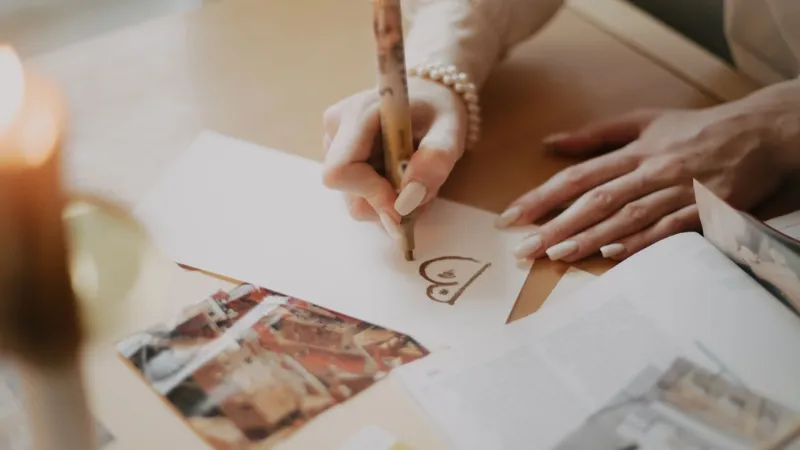
Making Professional Mockups at Home Opens New Doors
When your mockups can work across multiple platforms and fit in naturally, then you are not just simply designing with function in mind but building a creative presence. Clean layouts, realistic lighting, accurate proportions, and thoughtful styling can instantly elevate your hobby project into something that feels commercially polished.
By pairing strong design fundamentals with realistic presentation techniques, hobby creators can confidently showcase their own work in a way that feels authentic, professional, and even ready for print. And when you are ready to bring those designs to life, transforming your mockups into beautifully printed photo books, keepsake projects, or small gifts is a natural next step—you may already be halfway there!
Recommended Stories for You

Startuprise Nov 25, 2024
Startuprise Jul 14, 2026

Startuprise Nov 3, 2025

Startuprise Jun 4, 2026

Startuprise Oct 21, 2025
Startuprise May 21, 2026
Trending Stories

Best Gold IRA Companies for First-Time Investors Explained

Tips to find a broker in Asia

The Future of Group Health Insurance: Trends and Best Practices

Staff Augmentation Services: Access Top Talent Without Hiring Overhead

Practical Ideas to Use Custom Badges to Promote Your Business

7 Signs You Need a Financial Advisor in Singapore

Why Rent Car Dubai Is the Smartest Mobility Choice for Startups, Entrepreneurs, and Business Professionals
7 Best AI Video Generators for Creators, Marketing Teams, and Video Professionals in 2026