



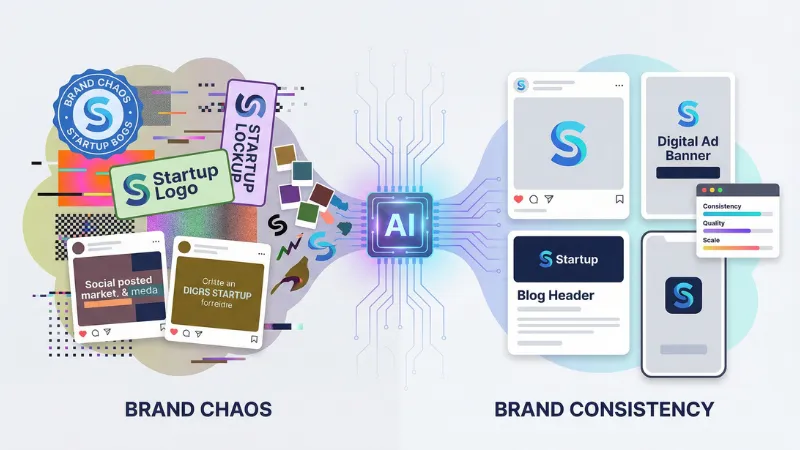
Your logo looks crisp on Tuesday, wobbly on Thursday, and unrecognizable by the weekend. Startups waste hours fixing these swings because most AI art tools create gorgeous, scattershot assets. That won’t work long-term. About 40 percent of small businesses already rely on generative AI—nearly double last year’s share, according to the Associated Press. Teams that lock brand coherence in early move faster and appear larger than they are. This guide ranks seven image generators that respect your style, explains our scoring framework, and pinpoints when to use each one.
How we ranked the tools
We didn’t pull this list from thin air. We built a scorecard that mirrors day-to-day startup reality: speed matters, budgets pinch, and every pixel must stay on brand.
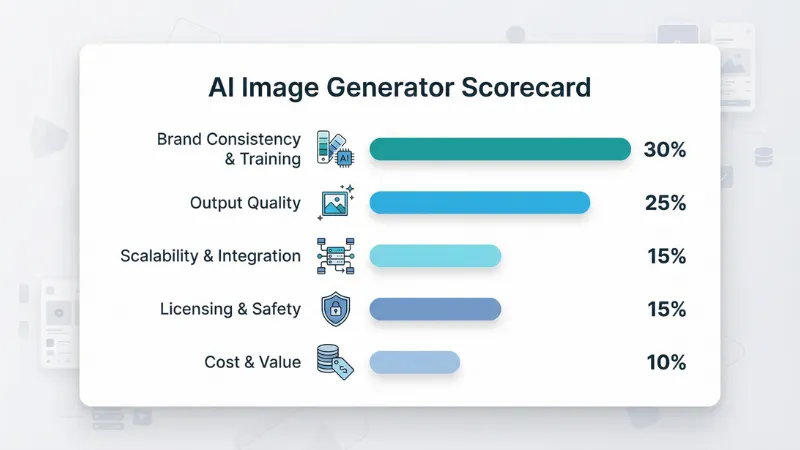
First, we weighted brand consistency and training at 30 percent. If a generator can’t hold your color palette or mascot, nothing else matters.
Next came output quality at 25 percent. Sharp, coherent images beat flat, fuzzy ones, no contest.
We assigned 15 percent each to scalability and integration and to licensing and safety. Your team needs exports that fit Figma or an API that feeds your app, and you deserve crystal-clear commercial rights, especially with lawsuits in the headlines.
The final 10 percent went to cost and value. We compared free tiers, credit systems, and enterprise quirks to reveal the true price per usable image.
During testing we ran every tool through the same grind: batch social posts, ad variants, and a five-image “style stress test.” Scores were averaged, rounded, and ranked so you can spot winners at a glance.
The framework is yours to copy for your own vetting process, and it keeps our recommendations honest.
Leonardo AI: best overall for brand consistency
Startups crave speed, consistency, and control in their visuals. Leonardo’s image generator delivers on all three and feels less like a generic art toy, more like a private studio that studies your brand’s DNA.
Upload 20 product shots or illustration samples, train a “personal model,” and the system starts sketching on-brand images in minutes. The results stay locked to your palette, line weight, and character style, so a carousel of social posts looks like it came from one steady hand, not six freelancers.
Quality holds up, too. Leonardo runs on the latest Stable Diffusion models, so photos stay sharp and illustrations land with clean edges. We spotted only minor drift on hyper-real textures, a trade-off most founders accept for the style control they gain.
Plans start with a generous free tier, then rise to about 10 dollars a month. Crucially, the commercial license has no revenue ceiling, so you won’t outgrow it the moment your Series A closes.
Small learning curve? Yes. A wall of settings greets new users. Give it an afternoon and you’ll never look back.
Adobe Firefly: best for enterprise-grade brand safety
Firefly speaks the language of cautious marketers. Every image springs from licensed Adobe Stock data, so you gain peace of mind before the first pixel lands on your site.
The star feature is Generative Match. Drop a reference shot beside your prompt, and Firefly echoes its colors, textures, and composition across new assets, locking them to your visual system, as detailed in Adobe’s October 2023 feature announcement.

Adobe Firefly Generative Match Interface Showing Brand-Safe Outputs
Outputs arrive at 4-megapixel resolution, which is plenty for social, ads, and light print. Because the tool lives inside Photoshop, Illustrator, and Express, you can nudge layers, swap typefaces, and export in your usual workflow. No messy hand-offs.
Pricing stays predictable. Creative Cloud plans include monthly generative credits, then charge a few cents per extra image. More important, Adobe indemnifies businesses on certain tiers, easing legal teams that still shiver at the Disney-versus-Midjourney headlines.
Choose Firefly when you need tight compliance, shared libraries, and designers who already breathe Adobe shortcuts. It may feel conservative beside showier art tools, but in regulated or high-stake launches, safety equals speed.
Midjourney: best for standout image quality
If you want investors to pause mid-scroll, Midjourney is the champ of photo-real textures, lighting, and composition.
Consistency is the trade-off. Midjourney still runs inside Discord and doesn’t let you fine-tune a private model, so you steer style with prompt phrases or by re-using an image reference. It works, but it takes practice. A new Style Creator feature, now in testing, promises reusable presets and should ease that friction soon.
Pricing starts at 10 dollars a month for a few hundred images. Unlimited tiers remain affordable, yet founders must note the revenue clause: once your company clears 1 million dollars, you’ll need an enterprise license. Early-stage teams are safe for now, but plan ahead.
Reach for Midjourney when you need hero shots, concept art, or bold landing-page banners. Pair it with Canva or Photoshop for logo overlays and text, and you’ll ship visuals that look far more expensive than they are.
AdCreative.ai: best for automated ad variations
When you need 50 ad concepts before lunch, AdCreative feels like a growth hacker on espresso. Load brand colors, logos, and a short value prop, then watch a grid of ready-to-run banners appear, each scored for predicted performance.
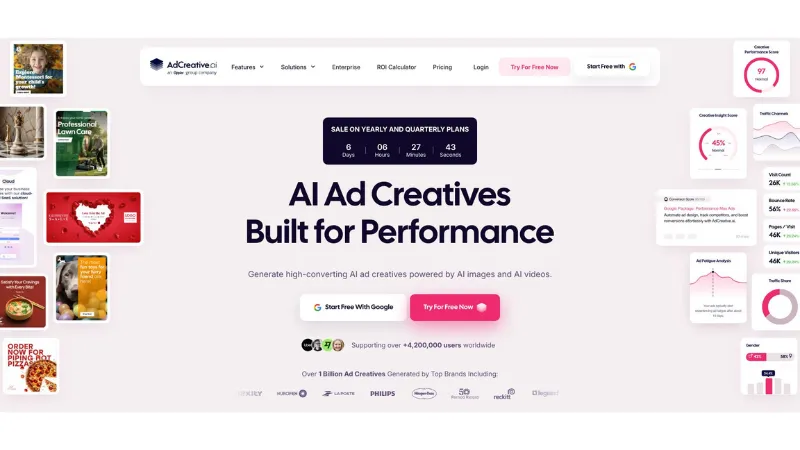
AdCreative.ai Dashboard with Multiple On-Brand Ad Variations
Because the platform sticks to your palette and auto-places your mark, every variant stays inside brand guardrails. No more ad sets drifting into off-tone gradients or random fonts. You can also resize a winning creative for Instagram Stories, LinkedIn feed, and Google Display with one click, which slashes production time.
Plans start at 29 dollars a month, a swap many founders see as replacing a freelancer retainer with a predictable SaaS line item. Outputs are fully yours, so legal review stays simple.
Choose AdCreative when speed testing matters more than bespoke artistry. It turns A/B ideas into polished assets so your growth team can focus on data, not design.
Canva Magic Studio: best for quick, on-brand design
For founders who moonlight as marketers, Canva feels like autopilot. Drop your logo and brand colors into its Brand Kit once, and every new project starts in the right hues.
Magic Studio adds AI. Ask for a “modern webinar promo” and it produces a full layout with background image, headline placement, and color-matched buttons in less than a minute. Tweak copy, swap photos, and publish. No design degree needed.
The built-in text-to-image tool isn’t Midjourney-level, but it’s strong enough for blog headers and social backdrops. The real advantage is speed: generate an image, then let Canva auto-resize it into 16 formats without breaking alignment.
A generous free tier gets you started. The Pro plan costs 13 dollars per month and unlocks unlimited Brand Kits, transparent backgrounds, and premium templates. For the price of lunch, your team gets a self-serve design system that always stays on color.
Choose Canva when you need reliable, everyday graphics at startup pace. It won’t craft avant-garde illustrations, but it will keep Instagram, pitch decks, and email banners looking like they came from the same creative brain.
Pebblely: best for product-photo cohesion
Product shots drive trust. Pebblely turns a single studio image into a full lifestyle library without hiring a photographer.
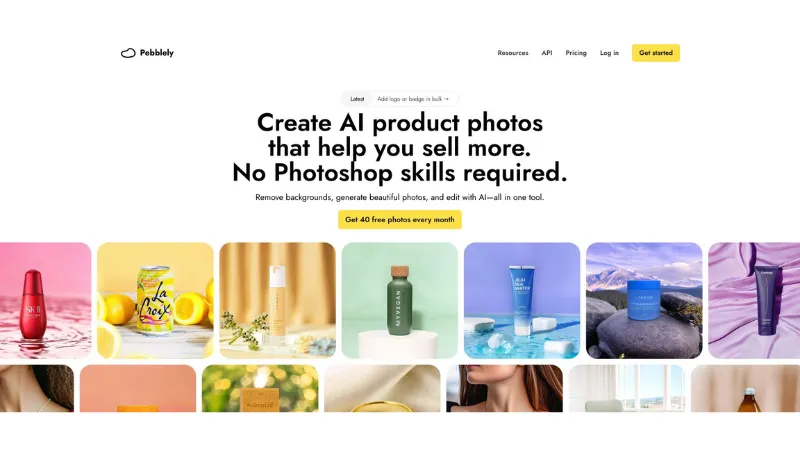
Pebblely Product Photo Variations from a Single Studio Shot
Upload a clean photo of your item, pick a mood—“pastel flat-lay,” “sun-soaked beach,” or “holiday sparkle”—and the AI drops your product into fresh scenes while preserving scale, lighting, and shadow. Each variation feels like it came from the same shoot, so catalog pages, email banners, and ads line up perfectly.
Color settings let you nudge backgrounds toward brand palettes. Need the same mug on five on-brand surfaces? Batch-generate in seconds, then export high-resolution PNGs for web or print.
Plans run about 30 to 50 dollars a month—peanuts compared with repeat photography. Outputs are yours to use anywhere, so legal review stays light.
Choose Pebblely when consistent product imagery is mission-critical, whether you sell skincare serums or SaaS dashboard mock-ups on devices. It keeps the hero object static while letting you swap seasons, locations, and vibes on demand.
Stable Diffusion DIY: best for ultimate control
Sometimes the only way to protect a secret sauce is to cook it in-house. Stable Diffusion lets your engineers spin up a private image factory that never leaves your servers.
Grab the open-source model, fine-tune it on a folder of brand images, and you can generate visuals no third-party algorithm has ever seen. Need your custom hardware rendered in sci-fi lighting? Train a LoRA and hit “generate.” The outputs stay consistent because the model learned directly from your assets, not a public prompt guessing game.
Cost scales with GPUs, not seats. Run small jobs on one consumer card or burst to cloud instances for a campaign push. Either way, you pay compute pennies instead of per-image credits. And because the code is yours, you can connect it to any workflow, including CI pipelines, a CMS, or even your own customer-facing app.
The catch? You need ML skills. Data prep, model checkpoints, and GPU drivers will eat a weekend if you’re new to the stack. For technical teams handling sensitive designs, the trade-off is worth the autonomy.
Choose Stable Diffusion DIY when privacy, on-prem compliance, or extreme style fidelity outweigh plug-and-play convenience. It’s the long road, but the view is all yours.
Side-by-side comparison at a glance
You’ve met the contenders one by one. Now let’s stack them shoulder to shoulder so you can spot trade-offs in seconds. Scan the style-control column first. If that box is weak, brand drift creeps in no matter how attractive the output looks.
| Tool | Best for | Brand style control | Quality | Pricing | Commercial license | Integration |
| Leonardo AI | Custom branded visuals | Personal model training | High | Free tier; from $10/mo | Yes, no revenue cap | Web + API |
| Adobe Firefly | Compliance-focused teams | Reference match slider | Very high | Credits in CC plans | Yes, with indemnity | Adobe apps |
| Midjourney | Show-stopping art | Prompt + style presets (beta) | Excellent | $10–$60/mo | Limited >$1M rev | Discord |
| AdCreative.ai | Rapid ads | Locks colors & logos | Good | $29–$149/mo | Yes | Web, basic API |
| Canva Magic Studio | Everyday graphics | Brand Kit templates | Decent | Free; Pro $13/mo | Yes | Web, mobile |
| Pebblely | Product photos | Fixed hero object | High (photos) | $30–$50/mo | Yes | Web download |
| Stable Diffusion DIY | Full control and privacy | Full fine-tuning | Varies by model | Hardware/compute cost | Yes | Self-host/API |
Use the table as your shortcut. Circle the row that matches today’s pain point, then dive back into that tool’s section for nuance.
Startup buyer’s checklist
Choosing a generator isn’t about finding “the best AI.” It’s about finding the one that removes the biggest bottleneck in your funnel. Run through this quick litmus test before swiping a credit card.
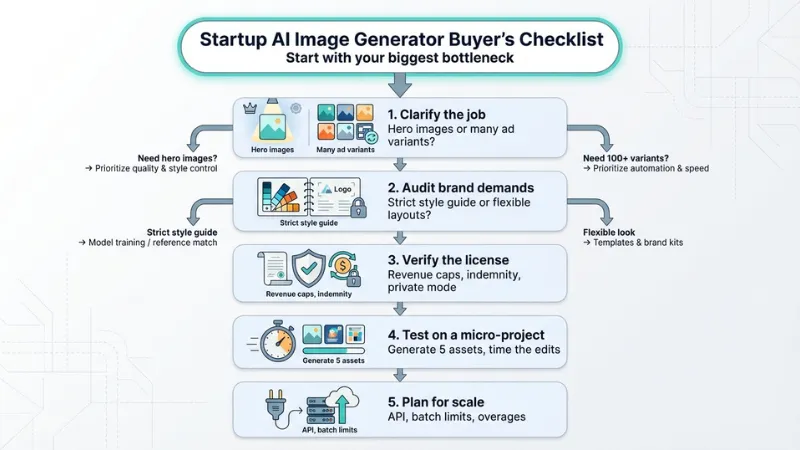
- Clarify the job. Do you need hero images that wow, or 100 ad variants that convert? Match the tool to the outcome, not the hype.
- Audit brand demands. If your visuals must match a strict style guide, stick with tools that offer model training or reference matching. If you just need clean layouts in your colors, Canva or AdCreative will do.
- Verify the license. Read the fine print on revenue caps, private mode, and indemnity. Midjourney’s 1-million-dollar clause surprises founders more than funding announcements do.
- Test on a micro-project. Generate five assets, drop them into your current workflow, and time the edits. The best tool makes designers faster and non-designers dangerous (in a good way).
- Plan for scale. Check API access, batch limits, and credit overages. Today’s hobby prompt can turn into tomorrow’s KPI, so choose a platform that grows with volume.
FAQs
Can we use these AI images commercially without legal headaches?
Yes. All seven tools grant commercial rights, though the details vary. Midjourney requires an enterprise license when annual revenue tops 1 million dollars, while Adobe goes further by indemnifying certain plans against copyright claims. Always skim the license page before launch day.
How do we train an AI on our exact style?
Upload a branded image set to Leonardo or fine-tune Stable Diffusion locally. Both approaches teach the model your colors, line work, and recurring characters so every new asset feels familiar. Firefly’s Generative Match offers a lighter path: no training required, just a single reference image and a similarity slider.
Will AI save money on design?
Founders who replaced simple production tasks with generators cut visual-content costs by 67 percent and tripled output volume, according to a 2025 survey by BusinessPlusAI. That’s an entire marketing intern’s salary back in the budget.
Which tool is safest for non-designers?
Canva Magic Studio. The Brand Kit corrals colors and logos, Magic Design lays out pages automatically, and guardrails prevent rogue fonts or off-brand hues. You’ll ship polished graphics without ever touching a Bézier curve.
Conclusion
Follow the checklist and you’ll pick a generator that adds velocity instead of tech debt.
