

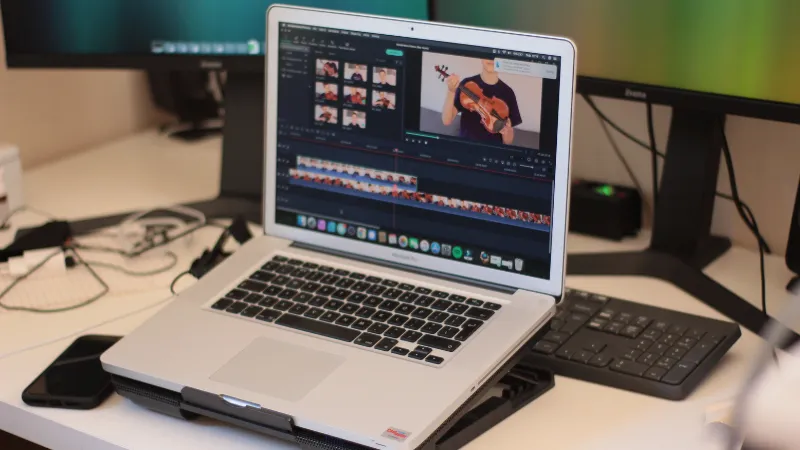
Video localization adapts a video's spoken message, subtitles and visible text for the customers who will use it in a particular market. For an Asian startup entering a new country, a useful first project is a product demonstration tied to one customer task, reviewed by someone who knows both the language and the product.
 Follow us
 Follow us
Consider a Singapore-based software team preparing an Indonesian onboarding video. Translating the narration while leaving an old payment screen in view can send the customer through the wrong steps. This is a hypothetical example, but it describes a practical review problem: the video has to match the product that the customer can actually access.
Where should a startup begin with video localization?
Begin with a market where there is a specific communication problem and a person available to review the result. Existing support questions, sales calls and onboarding conversations are better starting points than a list of every language a translation tool supports.
The International Trade Administration's website internationalization guidance distinguishes internationalization, regionalization and localization. Its country-specific stage addresses a particular market, while market research and analytics help refine regional opportunities. Applying that distinction to video suggests a sensible boundary: name the customer group and the task before commissioning language versions.
RECOMMENDED FOR YOU



athenahealth Apps in 2026: The AI Tools Every athenahealth User Should Know
Startuprise
May 8, 2026
For example, a founder might choose a demonstration of inviting a colleague to a project because prospects already ask how permissions work. The pilot then has an observable purpose. A general brand film may attract viewers, but it gives the team less information about whether someone can use the product.
Keep the initial brief short: target customer, language, product version, customer task and reviewer. Avoid assigning a language to an entire country without checking who the intended users are. A regional sales partner and a consumer buying through a mobile storefront may need different wording even in the same market.
What must change before the translation starts?
Correct the source video's product instructions and separate fixed terminology from wording that a local reviewer may adapt. This prevents the translation stage from preserving mistakes that were already in the original.
Watch the source with the current product open. Check button names, eligibility statements and the destination of each call to action. If the feature is unavailable to the target customer, replace that scene. A polished translation cannot make the feature available.
Prepare a small glossary with the product name, feature names and terms that could have several meanings. Include enough context to distinguish an account balance from account access, or a project owner from a business owner. Give the reviewer the actual screen that accompanies each line.Element Keep consistent Review for the target market Product name Approved spelling Pronunciation in narration Button instruction Action in the current interface Exact label the customer sees Price example Approved offer and billing period Currency and displayed notation Support instruction Available support route Language and operating hours promised Customer example Actual product capability Familiar task and appropriate wording
The table is a production brief, not a claim that all listed changes are automatic. Some require a new source scene or a product decision before translation can proceed.
How can the team produce a translated version?
Use the approved source as the input, choose the required language and reserve time to inspect the result against the original brief. A small pilot makes the review work visible before the team commits to a full video library.
Leadde.ai lets teams translate videos into other languages. Its published video translation workflow covers spoken voice, subtitles and on-screen text, with optional lip sync, and lists support for 88 languages and 175 dialects. The dialect count describes language varieties; it is separate from the language count. Confirm the required language is available for the specific job before scheduling its release.
Choose features according to the footage. A software demonstration without a visible speaker does not need mouth movements adjusted. The more consequential checks are whether the instruction is accurate, whether the correct screen is visible when it is spoken, and whether translated text fits where the viewer must read it.
Do not approve a version after checking only the translated transcript. Play the video through. An accurate sentence can still arrive after the screen it describes has disappeared. A subtitle can obscure the control the customer is supposed to select. Log the scene or timestamp with each correction so the next reviewer can find it.
Who should sign off on the localized video?
Someone familiar with the target users should review the language, and someone responsible for the product should verify the instructions. In a small startup these may be the same person, but both checks still need to happen. Record who can approve a correction when the usual reviewer is unavailable.
Enterprise Singapore's guidance on preparing for overseas expansion highlights the value of trusted partners who understand local business preferences and help overcome language barriers. For a video pilot, a qualified local reviewer can serve a narrower purpose: identify wording that is understandable in isolation but misleading in the customer journey.
Ask the reviewer to mark each issue as meaning, product accuracy or presentation. A mistranslated feature name needs a terminology fix. A missing payment option needs a product or scene change. Clipped text needs a layout correction. Keeping the categories separate helps the founder assign the fix to the right person.
How do you decide whether to translate more videos?
Expand after customers can complete the intended task and the team can maintain the first version. Ask a target-market user to follow the demonstration without coaching, then note where they hesitate or seek help. Record whether they finish the task, which step causes trouble and which video version they watched.
A pilot can expose confusing instructions, but it does not establish that translation caused a change in sales. Traffic source, product changes and customer mix can also affect the result.
Keep the video title, source version, target language and approval date together in a simple register. When a button or workflow changes, use that register to find the affected versions and mark them for review before further distribution. Translation turns one asset into several maintenance commitments; the record keeps old instructions from circulating unnoticed.
Choose the next video from the next unresolved customer question. That gives the team a reason for every localized asset and a concrete way to review whether it helped.
Recommended Stories for You
Startuprise Apr 27, 2026

Startuprise Oct 29, 2025

Startuprise May 5, 2026

Startuprise Jun 23, 2026
Startuprise Feb 24, 2026

Startuprise Jun 10, 2026
Trending Stories

Staff Augmentation Services: Access Top Talent Without Hiring Overhead
7 Best AI Video Generators for Creators, Marketing Teams, and Video Professionals in 2026

Tips to find a broker in Asia

The Future of Group Health Insurance: Trends and Best Practices
7 Signs You Need a Financial Advisor in Singapore

Practical Ideas to Use Custom Badges to Promote Your Business

Why Rent Car Dubai Is the Smartest Mobility Choice for Startups, Entrepreneurs, and Business Professionals

How to Choose the Right Insurance Policy When Considering 1 Crore Term Insurance