

 Follow us
 Follow us
The best lecture tools reduce the amount of context a student has to hold in their head. That was the lens I used while reviewing LectMate. I did not want to see only a transcription box. I wanted to know whether the product could support the entire path from live class to useful review material. Based on the public site and the workspace that opened in Chrome, LectMate is being shaped as a browser-based lecture notes tool with a strong bilingual study angle.
The product story starts with attention
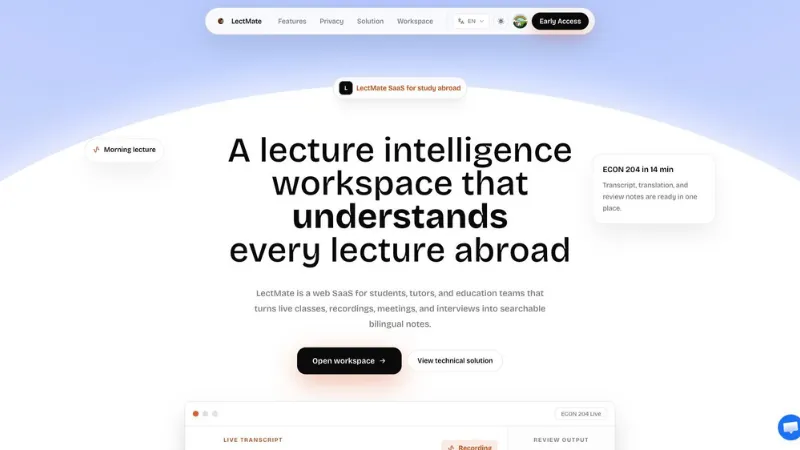
The homepage tagline describes LectMate as a lecture intelligence workspace that understands every lecture abroad. That is a bold promise, but the supporting copy keeps it concrete. The site talks about live classes, recordings, meetings, and interviews becoming searchable bilingual notes. The hero example shows a lecture title, speaker turns, English transcript text, Chinese translation, keywords, summary, and follow-up actions.
That example maps well to a real classroom pain point. If a student is listening in a second language, they may catch most of the lecture but still lose exact wording, definitions, or examples. They may understand the main idea, then struggle later when writing an assignment. A transcript alone helps, but a transcript connected to translation, keywords, and source replay is much more useful.
The interface also feels intentionally education-focused. It does not rely on a generic "AI productivity" pitch. Instead, it speaks to lectures, office hours, study abroad, bilingual notes, and review. That makes the product easier to place in a student's daily routine.
That clarity is useful for adoption. Students usually do not want to configure a complex knowledge-management system before every class. They want a tool that understands the pattern of a class session: someone speaks, important ideas are mixed with examples, terms need to be captured accurately, and the output needs to be easy to revisit. LectMate's homepage communicates that pattern quickly.
Review features are treated as part of the core product
RECOMMENDED FOR YOU

How to Build AI Influencers With Deepfake Maker Nano Banana Pro: Step-by-Step Guide
Startuprise
Dec 16, 2025

athenahealth Apps in 2026: The AI Tools Every athenahealth User Should Know
Startuprise
May 8, 2026
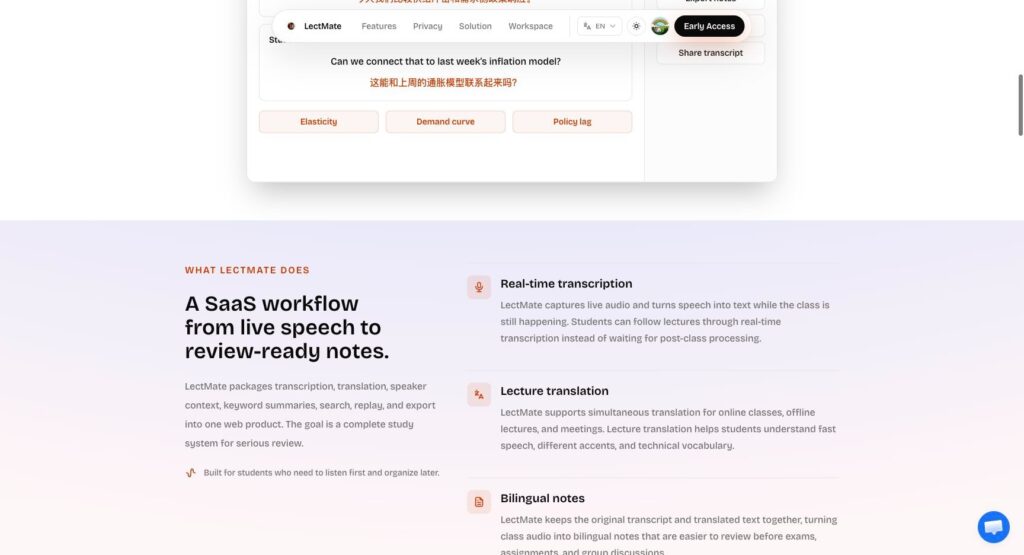
The feature section shows why LectMate should not be evaluated only as a speech recognition tool. The visible capabilities include real-time transcription, lecture translation, bilingual notes, keyword summaries, search and replay, and import/export controls. These are review features, not decorative add-ons.
Search and replay are especially important. Students often remember that a professor mentioned a concept, but not exactly when. A searchable transcript that can take them back to the source moment can save a lot of time. Bilingual notes can also reduce friction for students who think in one language but need to study or submit work in another.
The workflow section is similarly practical. It describes capturing the live moment, translating while context is fresh, organizing material, and then searching, replaying, or exporting. That is close to how lecture material is actually used. A student does not need all features at once; they need the right feature at the right stage of the study cycle.
The product also treats language as part of the learning workflow rather than a simple localization setting. A multilingual student may want the interface in English, the original transcript in English, and notes in another language. Or they may want to keep both languages visible so terminology is not lost. The visible language and translation emphasis makes LectMate feel aligned with that reality.
The import and export story is another reason the feature set feels practical. Students often need to move information into coursework, shared notes, or a personal archive. If a lecture workspace can capture the session and then let the student export the useful parts, it fits into existing habits instead of forcing every review task to happen inside one app.
The workspace makes model choices visible
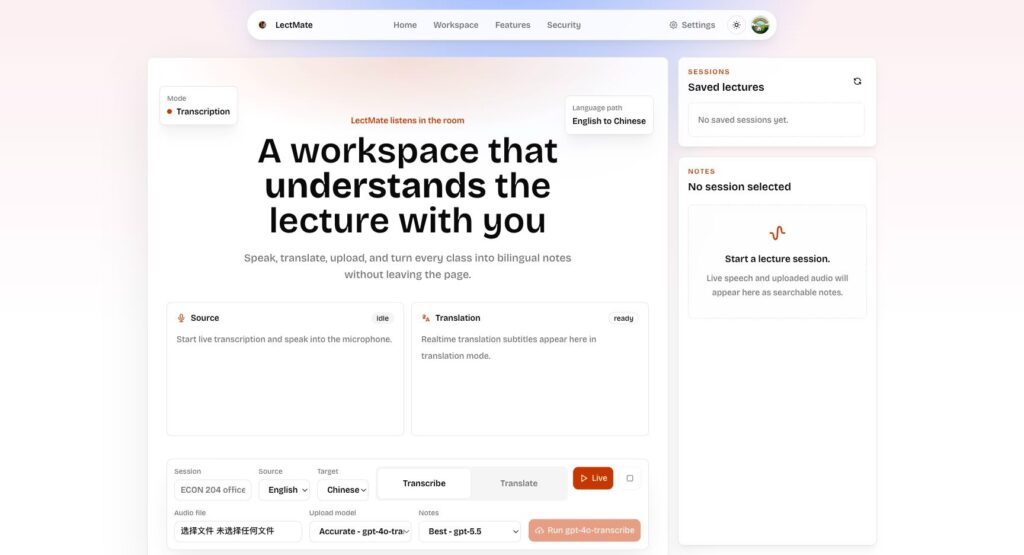
The workspace screen made the product feel more tangible. It includes language direction controls, source and translation panels, mode buttons, audio upload, saved lectures, and notes. It also exposes processing choices such as accurate transcription, economy transcription, speaker-aware transcription, and notes models. That is a useful sign because lecture processing is not one-size-fits- all.
A short office-hours recording may be fine with a lower-cost option. A complex seminar with multiple speakers may need speaker labels. A student preparing for an exam may care more about well-structured notes than perfect diarization. The visible controls suggest that LectMate is thinking about those tradeoffs.
I did not run a live capture or upload job during this review. That would be the next step for testing accuracy and output quality. But from the observed states, LectMate has a clear product spine: capture speech, keep the transcript and translation connected, generate notes, and make the session searchable. That is the right direction for a browser-based lecture notes product.
I would still want to see how the workspace handles long sessions. A two-hour seminar can create a lot of transcript text, and the quality of search, segmentation, summaries, and exports becomes more important as the session grows. The good sign is that the current workspace already separates saved lectures from notes, which leaves room for longer-term organization by course, topic, or date.
The next product proof would be consistency across multiple sessions. One lecture note is useful; a searchable semester is more valuable. If LectMate can keep sessions tidy over time, the product could become a student's memory layer for classes where verbal explanation matters as much as slides.
Recommended Stories for You

Startuprise Mar 14, 2026

Startuprise Feb 18, 2026

Startuprise Jun 19, 2026

Startuprise Jun 3, 2025

Startuprise May 22, 2026

Startuprise May 16, 2026
Trending Stories
Staff Augmentation Services: Access Top Talent Without Hiring Overhead
7 Best AI Video Generators for Creators, Marketing Teams, and Video Professionals in 2026

Tips to find a broker in Asia

The Future of Group Health Insurance: Trends and Best Practices

7 Signs You Need a Financial Advisor in Singapore

Practical Ideas to Use Custom Badges to Promote Your Business

Why Rent Car Dubai Is the Smartest Mobility Choice for Startups, Entrepreneurs, and Business Professionals

How to Choose the Right Insurance Policy When Considering 1 Crore Term Insurance